Hey there! I’m Matt Wolfe, and I want to share with you some of the best tips, tricks, and powerful prompt strategies for ChatGPT that I’ve been using in 2025. Whether you want to boost your productivity, learn new skills, improve your mental health, or just simplify your life and business, this guide will help you become a ChatGPT pro.
Over time, the way we interact with ChatGPT has evolved, and today I’m diving deep into what works right now. I’ll show you how I personally use ChatGPT through projects, share some life-changing prompts, and even reveal some advanced prompt engineering techniques that most people don’t know about. Plus, I’ll include some handy cheat codes and clever hacks to make your prompting smoother and more effective.
So, buckle up! This is your ultimate guide to mastering ChatGPT prompts in 2025.
Table of Contents 📚
- Best Practices for Prompting Like a Pro
- How I Personally Use ChatGPT: Projects and Custom Instructions
- Prompts That Simplify Life and Business
- Prompts That Upgrade Your Hobbies & Skills
- Critical Thinking Prompts That Reveal Blind Spots
- Secret ChatGPT Modes: Cheat Codes from Reddit
- Advanced Prompt Engineering Techniques
- Final Thoughts
- FAQ
Best Practices for Prompting Like a Pro 🧠
First off, let’s talk about the basics of how to get the best responses from ChatGPT. The key is in how you give your prompt. Here are some tips that really make a difference:
- Be specific about the output format. Tell ChatGPT exactly how you want the answer. For example, ask for a checklist, a table, JSON format, or even a YouTube script. If you want an article summarised, say “Give this to me as a checklist,” and it will summarise accordingly.
- Assign a role or character. You can ask ChatGPT to act as a financial advisor, an expert health coach, or even a drunken pirate! This makes the responses tailored and fun.
- Give detailed instructions. For example, instead of “Give me ideas,” say “Give me five video title ideas under 50 characters that focus on FOMO.” The more specific you are, the better the output.
- Use iteration loops. This is where you ask ChatGPT to write a rough draft, then critique its own draft, and then improve it based on the critique — all in one prompt. This leads to much better and polished results.
To sum it up, clear, detailed, and structured prompts yield the best results. Don’t be afraid to experiment with the format and the role you assign.

How I Personally Use ChatGPT: Projects and Custom Instructions 🗂️
One of my favourite ways to use ChatGPT is through projects. Think of a project as a special folder where you keep related chats, files, and custom instructions that shape how ChatGPT responds. Here’s how I use it:
- Create a project for each big area. For example, I have projects for “New Video Game,” “Journal,” “Health Coach,” “Investment Advisor,” and “Explain This For Me.”
- Add custom instructions to each project. These instructions set the role and context. For example, in my video game project, I tell ChatGPT: “You are an expert game designer and developer, inspired by rogue-like games, and a world-class coder.” This way, every prompt I give within this project follows these guidelines.
- Add files for extra context. You can upload documents, images, or code files that ChatGPT can use to give better answers.
- Keep your projects organised. Every new prompt within a project remembers the context and builds on previous chats, making it much easier to work on complex tasks over time.
Let me give you a quick example from my game design project. I asked ChatGPT to help design a colourful game based on wolves and monkeys. It came up with Wolf and Monkey Primal Clash, a rogue-lite action brawler where you switch between a wild wolf and a clever monkey to traverse procedurally generated jungle arenas. Each character has a unique playstyle, and you can merge them into a hybrid for powerful attacks. Pretty cool, right?
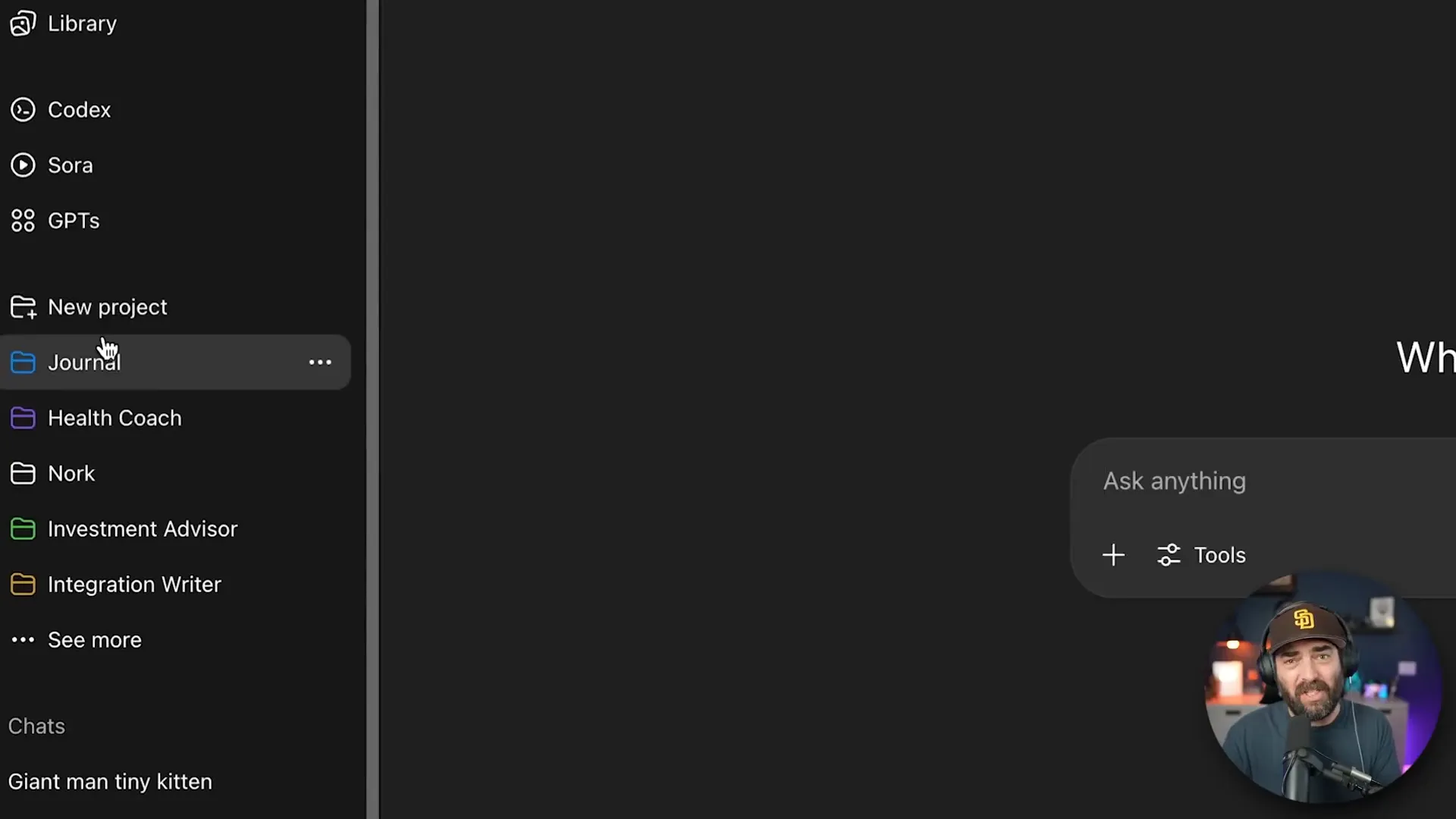
Projects are also great for personal growth. My journal project lets me brain dump thoughts and struggles. I’ve set it up as a journaling assistant that listens, offers advice, and gives tough love when needed. Because I included personal details like my work, family, and past struggles, it can give personalised and meaningful feedback every time I write.
Similarly, my health coach project helps me with workout plans, meal routines, and supplement advice. It knows my schedule, equipment, eating habits, and even my busy family life, so it tailors everything to fit me perfectly.

Finally, my “Explain This For Me” project is a lifesaver for simplifying complex articles and research papers. I ask it to give me a high-level summary, bulleted key points, analogies, and even a quick one-minute soundbite explaining why the news matters. This helps me prepare my weekend news videos quickly and clearly.

Prompts That Simplify Life and Business ✂️
Now, let’s get practical. Here are some prompts that can make your daily life and business easier. These come from some great resources like Jenna Kutcher’s article on life-saving ChatGPT prompts.
| Prompt | Purpose | Example Output |
|---|---|---|
| List three powerful wellness habits for better sleep, digestion, and mental clarity. Break them into morning, midday, and evening routines for a busy person. Keep it under five minutes. | Quick wellness routines for busy people |
|
| Take this story and turn it into a 10-slide carousel with a story arc, a caption that opens with a strong hook, and a story sequence with built-in engagement prompts. | Create social media content quickly |
|
Another great hack is to ask ChatGPT for recipes without all the fluff. Instead of scrolling through long articles, you can ask for a direct recipe, such as “Give me a recipe for amazing ribs cooked on my Traeger grill.” If you enable web search, it will pull fresh recipes from the web and give you a clean, straightforward recipe.
Trust me, these simplified prompts save a ton of time!
Prompts That Upgrade Your Hobbies & Skills 🎯
Want to get better at a hobby or skill? ChatGPT can help you create structured learning plans and quiz you to lock in knowledge. Here are two prompts I love, inspired by a Tom’s Guide article:
- Write me a 30-day plan for whatever hobby you want to learn.
For example, I asked for a 30-day plan to improve my aerial drone photography skills. It broke it down into weekly themes like learning FAA rules, composition, advanced techniques, and portfolio prep. Each day has a clear task, and there’s a gear checklist and tips too. - Quiz me on the history of AI.
This helps reinforce what you learn. ChatGPT asks questions, then provides an answer key so you can test yourself. For example, it asked about the 1950 paper by Alan Turing, the 1956 Dartmouth workshop, and the 1966 chatbot Eliza.

These prompts are a fantastic way to turn ChatGPT into your personal tutor and practice partner.
Critical Thinking Prompts That Reveal Blind Spots 🤔
ChatGPT isn’t just for simple tasks — it can help you think deeply and challenge your assumptions. Here are some prompts that I use regularly to sharpen my thinking:
- I believe [blank]. What hidden assumptions am I making? What evidence might contradict this?
For fun, I tried “I believe the Earth is round.” ChatGPT listed assumptions like trusting mainstream physics and sensory cues, and then presented flat earth arguments with their rebuttals. It even explained why the globe model still wins. - If you were trying to convince me this is a terrible idea, what would be your most compelling arguments?
I asked it to discourage me from building and selling a video game on Steam. It pointed out the fierce competition, low revenue for most games, marketing challenges, and costs. Then I asked for counterarguments to see the other side. This helps me weigh decisions better. - What might be the unexpected second and third order consequences of [a decision]?
For example, I asked about selling my website “Future Tools.” ChatGPT identified risks like loss of credibility, newsletter growth stalling, reputational damage, and SEO challenges. It also gave gut check questions to consider before selling.

These prompts are invaluable for anyone making big decisions or trying to see things from all angles.
Secret ChatGPT Modes: Cheat Codes from Reddit 🎮
Here’s a little secret from the ChatGPT community: there are quick cheat codes you can use inside ChatGPT to speed up your prompting. These come from a Reddit post by “stuck in good.”
| Cheat Code | Meaning | Example |
|---|---|---|
| ELI5 | Explain Like I’m 5 (simple explanation) | “Quantum computing ELI5” gives a very simple explanation anyone can understand. |
| TLDR | Summarise long text | “Article about AI TLDR” returns a brief summary. |
| Jargonize | Add technical jargon | “Quantum computing jargonize” outputs a technical, expert-level explanation. |
| Humanize | Make text less technical and more conversational | “Quantum computing humanize” simplifies jargon for everyday people. |
| Feynman Technique | Teach complex topics simply, test understanding, then refine | “Teach me quantum computing using the Feynman technique” breaks down the topic step-by-step. |

These cheat codes are super handy shortcuts. Instead of typing long instructions, just add these keywords to your prompt and get the style you want immediately.
Advanced Prompt Engineering Techniques ⚙️
Now for the big guns. These techniques take your ChatGPT experience to the next level. They focus on logical thinking, exploring multiple possibilities, and self-improvement of responses.
Tree of Thought Exploration 🌳
This technique makes ChatGPT explore several possible solutions or ideas before picking the best one. For example, I asked it to solve “job loss due to AI” by exploring three distinct solution branches:
| Branch | Idea | Quality Score (0-10) | Summary |
|---|---|---|---|
| 1 | Upskill in time with lifelong learning ecosystem | 9 | Focus on retraining workers with micro-credentials and wage subsidies. |
| 2 | AI dividend with universal basic income and tax reform | 6 | Redistribute AI productivity gains via UBI but politically challenging. |
| 3 | Work sharing and productivity dividend | 7 | Reduce workweek hours as AI boosts productivity. |
After ranking, it chose branch 1 as the best solution, explaining its strengths and weaknesses in detail. This method is brilliant for tackling complex problems by considering multiple angles.

Self-Consistency Voting 🗳️
This one asks ChatGPT to generate multiple independent answers to a question, then vote on the best one. For example, I asked it how to train AI without stealing creators’ work. It generated five different reasoning paths and voted for the majority view: only train on publicly licensed or public domain data and compensate creators fairly.
This technique ensures the answer is robust and well thought out.

Reflection & Self-Critique Loop 🔄
Here, ChatGPT drafts an answer, then critiques its own response for flaws or gaps, and finally improves the answer. For example, I asked “What is responsible for climate change?” It first gave a basic answer, then pointed out missing citations, oversimplifications, and missing equity context. Then it produced a much more detailed, accurate, and nuanced final answer.
This method is great for getting thorough, high-quality responses.

Automation-Workflow Finder 🤖
This prompt turns ChatGPT into a senior automation consultant. It asks you diagnostic questions about repetitive tasks in your job or life, ranks the top automation opportunities, suggests tools, and gives a step-by-step plan to implement automation.
For example, it identified my top five automation chances like video ideation, sponsor follow-ups, automated news feeds, and creative memory management. It then recommended tools and workflows to make these tasks easier.

Creative Mode: Build Your Own World 🌍
Finally, you can turn ChatGPT into a world engine to create interactive stories or games. You give it a genre like solarpunk mystery, and it will narrate scenes, maintain a dynamic world state, and offer branching choices. Your decisions influence the story’s direction, making it like a text-based game.
I tried a solarpunk mystery where I had to choose between reporting to an archivist, exploring ruins, or confronting enemies. The story adapts and remembers your choices as you play.

Final Thoughts 🎉
These are some of the coolest ChatGPT tricks, prompts, and strategies I’ve discovered and used myself. This list isn’t exhaustive, but it should give you tons of ideas to experiment with and improve your ChatGPT experience.
Whether you want to simplify your life, make better decisions, automate workflows, or just have fun with creative storytelling, there’s a prompt or technique here for you. The key is to be specific, iterate, and use projects to keep your work organised and personalised.
Thanks so much for nerding out with me over ChatGPT today! I hope you found this guide helpful and that it sparks new ideas for your own AI journey.
FAQ ❓
What are the best practices for writing prompts to ChatGPT?
Be specific about the output format, assign a role or character, give detailed instructions, and use iteration loops where the model critiques and improves its own responses.
How do projects in ChatGPT help me?
Projects let you organise chats with custom instructions and files, keeping context consistent. This makes complex tasks easier and more personalised.
Can ChatGPT help with mental health or therapy?
ChatGPT can guide you through minor therapy exercises like cognitive behavioural therapy (CBT) techniques, but it’s not a replacement for a professional therapist.
What are some quick cheat codes to use with ChatGPT?
Use shortcuts like ELI5 (Explain Like I’m 5), TLDR (Summarise), Jargonize (Add technical language), Humanize (Simplify language), and Feynman Technique (Teach and test understanding).
What is tree of thought exploration in ChatGPT?
It’s a prompt engineering strategy where ChatGPT explores multiple solution branches for a problem, evaluates them, and selects the best one with justification.
How can I automate repetitive tasks using ChatGPT?
Use the automation-workflow finder prompt, which asks diagnostic questions, ranks automation opportunities, suggests tools, and provides a step-by-step plan.
Feel free to start experimenting with these prompts and techniques to unlock the full power of ChatGPT in your daily life and work!